Buy Facebook accounts: what to check before you pay and how to log in

When you buy Facebook accounts for ads, finding a seller is the easy part. The hard part is keeping the account alive after your first login.
A bought account lasts longer when Facebook sees your login as the old session continuing. That means logging in with cookies instead of the password, using a proxy from the country where the account used to live, keeping each account in its own browser profile and taking the first days slowly. The password, email and phone can be changed later.
Contents
- What you buy: autoregs, warmed-up and aged accounts
- What to check before you buy Facebook accounts
- How to log in to a bought Facebook account with cookies
- The first days after login
- If Facebook asks you to log in again
- FAQ
- Cheat sheet
What you buy: autoregs, warmed-up and aged accounts
Accounts sold for advertising usually fall into three groups.
- Autoregs are fresh accounts registered in bulk, usually by software. They are the cheapest, but they have no history, so you’ll have to warm them up yourself before running ads.
- Warmed-up accounts were used for a while after signup, by hand or by a program: someone visited sites, filled in the profile, liked posts and joined groups. People buy warmed up Facebook accounts because they already look like a real person’s page.
- Aged accounts were registered long ago, sometimes years back. They have friends, posts and activity, and they usually cost the most.
Some sellers also offer accounts with an ad account or a Business Manager already set up.
The more history an account has, the more it costs, and the more you lose if the first login goes wrong.
What to check before you buy Facebook accounts
Before you pay, ask the seller what comes with the account and in what form. To log in with cookies, you’ll need the following.
- Cookies in JSON. This is the format the Cookie-Editor and EditThisCookie extensions export. A Netscape cookies.txt file works too: you can convert it to JSON with our free cookie converter.
- Cookies for facebook.com. Cookies from Instagram won’t log you in to Facebook.
- Fresh cookies. Session cookies don’t live long, so it’s better if the seller exported them shortly before the sale.
- The account’s country. You’ll buy a proxy for that country, so find it out in advance.
- The login, password and email access. You’ll log in with cookies, but you’ll need the password and email later, once the account has settled on its new device.
If the seller can’t tell you which country the account is from or sends cookies in an unclear format, it’s better to find another seller.
How to log in to a bought Facebook account with cookies
To keep a bought account from dropping off after the first login, you need three things.
The first is a cookie login. To Facebook, it looks like the old session continuing: the site sees a user who is already signed in and doesn’t ask for a password or an SMS code. A password login from a new device looks suspicious, and Facebook may ask you to confirm it’s you.
The second is a proxy from the country where the account lived before. If the account was in Germany yesterday and shows up from Brazil today, Facebook may drop the session. Every account also needs its own proxy, because a shared IP is the most common reason accounts get banned in bulk.
The third is one account per profile. Two accounts opened in the same browser share an IP and a device fingerprint, so Facebook can easily link them. Our guide to managing several Facebook accounts explains how this linking works.
Here is what people get wrong and why it doesn’t work:
| What people do | What Facebook sees | Do this instead |
|---|---|---|
| Log in with the password from a new device | A login from an unknown device | Log in with cookies and leave the password for later |
| Use a proxy from a different country than the account’s | The account was in one country yesterday and in another today | Use a proxy from the country where the account lived |
| Change the password, email and phone on day one | A new device that immediately changes all the login details | Wait a few days, then change them |
| Keep two accounts in one profile | Two accounts from the same browser and device | One profile, one account |
| Use one proxy for several accounts | Several accounts from one IP | Give each profile its own proxy |
| Run ads and mass actions in the first days | A sudden burst of activity from a new device | Only light actions for the first days |
Accovod is our browser for working with multiple accounts, so we’ll show the login using it. Each Accovod profile has its own cookies, storage, proxy and a unique fingerprint. All profiles sit as a list in one window, and you switch between them in one click, like tabs. Accovod runs on Windows and Mac, and the iPhone and iPad app opens the same cloud profiles.
To log in to a bought account:
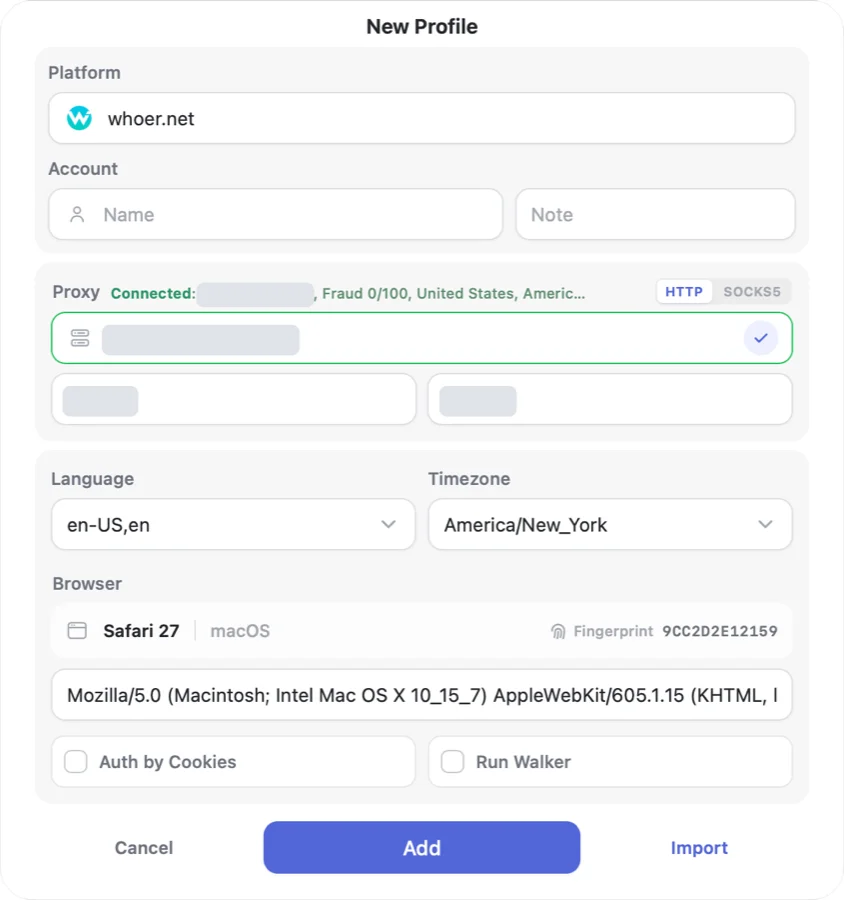
- Click New Profile, enter facebook.com in the Platform field and a name you’ll recognize the account by in the Account field.
- Paste a proxy from the account’s country (HTTP or SOCKS5) and click the check mark. Accovod shows the IP, country and Fraud Score and sets the profile’s language and time zone to match the proxy. For new and valuable accounts, it’s better to keep the Fraud Score under 25.
- Tick Auth by Cookies, paste the seller’s JSON and confirm. If the cookies are in Netscape format, convert them first.
- Click Add. The profile opens already logged in to the account.
- If a team works with the accounts, add the profiles to a cloud group and share it by email (Cloud plan). Your teammates work in the same accounts, and the passwords stay with you.
You can read more about logging in with cookies in our docs.
If the proxy goes down, pages in the profile simply stop loading. Accovod doesn’t fall back to your real IP, so the account won’t suddenly show up from another country.
The Local plan costs $15 a month, and Cloud, with cloud profiles and team sharing, costs $25 a month (prices as of October 2026).
The first days after login
For the first few days, the account is getting used to its new device. Don’t change the password, email or phone during this time: when a new device immediately changes all the login details, it looks like the account was hijacked.
Behave like an ordinary user. Scroll the feed and fill in the profile if it’s empty. Leave ads, mass follows and messaging for later, take pauses between actions and don’t send everyone the same message.
You can also warm up the profile with ordinary sites such as news, search and video. In Accovod, Walker does this for you by browsing sites inside the profile.
Don’t change the proxy country of a live account. If a proxy dies, get a new one in the same country, ideally in the same city. Don’t change the fingerprint without a reason either, because a new User-Agent means a new device to the site. And make sure only one person has a profile open at a time, since two parallel sessions look suspicious to Facebook.
All these rules are collected in our checklist on how to avoid bans. Once the account has worked for a few days without any checks, you can change the password and email and slowly move on to ads.
If Facebook asks you to log in again
If you see the login page instead of the feed, the session didn’t take or was dropped. The reason is usually one of these four:
- The cookies expired. Ask the seller for a fresh export.
- The cookies are for another site. You need cookies for facebook.com.
- The proxy is in another country. Facebook may drop the session if the account was in one country yesterday and in another today.
- The format is wrong. Accovod needs a JSON array, and a Netscape file has to go through the converter first.
You don’t need a new profile for fresh cookies. Open the profile’s edit form (the pencil on the profile card), click Cookie Editor, paste the JSON and click Set, then Save in the form. After that, reload the page so the site picks up the new session.
If the cookies work but Facebook still asks for the password, log in with the seller’s password in the same profile and with the same proxy. Check the proxy too: the built-in check shows which country you’re connecting from.
If the account is already banned, new cookies or a different proxy won’t bring it back.
FAQ
Can you buy a Facebook account?
Yes, many shops sell them. But Meta’s Terms say users must not “transfer your account to anyone else (without our permission)”. So Facebook can restrict a bought account at any time, and that risk stays with the buyer.
What is an aged Facebook account?
It’s an account that was registered long ago and has friends, posts and activity. People buy aged Facebook accounts because a long history makes the account look like a normal user’s. Age won’t help if the login looks new, though, so log in with cookies and a proxy from the account’s country.
What does a warmed-up Facebook account mean?
It means someone used the account for a while after signup: visited sites, filled in the profile, liked posts and joined groups. It costs more than a fresh autoreg because it already has some activity, and less than an aged account.
Can I buy a Facebook ad account?
Yes. Sellers offer accounts with an ad account already created, sometimes together with a Business Manager. When you buy Facebook ads accounts, log in the same way: with cookies, in a separate profile and with a proxy from the account’s country. Don’t launch ads on the first day.
Why buy a US Facebook account?
Usually to run ads for a US audience. Such an account needs a US proxy, ideally from the same city as before, because a sudden change of location after a cookie login often resets the session.
Cheat sheet
- If you have one or two accounts, give each one its own profile with a proxy from the account’s country and log in with cookies. The Local plan is enough.
- If you have ten or more, the same rules apply to each account. Walker can take care of the warm-up, and all profiles stay in one list in one window.
- If a team works with the accounts, share a cloud group by email. Nobody needs the passwords. Just make sure each profile is open for only one person at a time. This is the Cloud plan.
- If Facebook asks you to log in again, add fresh cookies through the Cookie Editor and check the proxy country.