Browser fingerprinting: what it is and what a separate profile changes

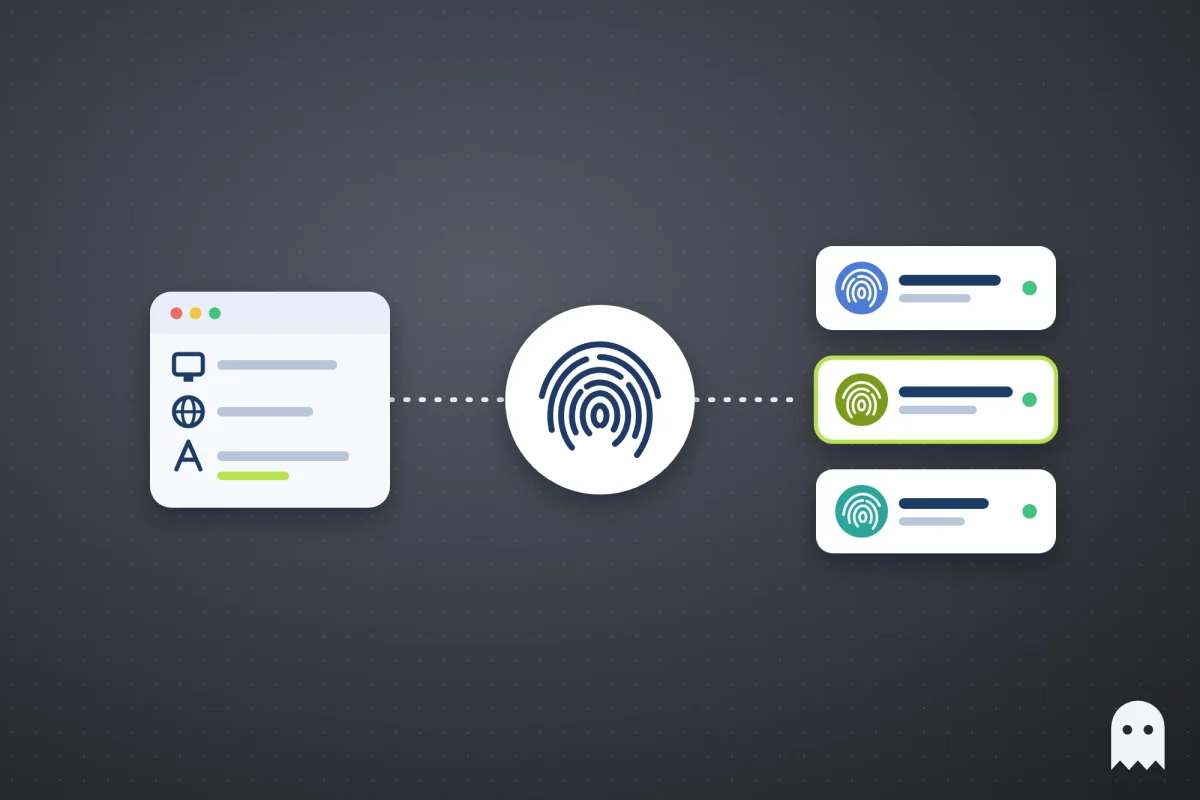
Browser fingerprinting is a way for websites to recognize your browser by its settings and hardware instead of by cookies. A script on the page reads your screen size, time zone, language, fonts, graphics card and a few dozen other values, and together they make a profile that rarely matches anyone else’s.
Clearing cookies or opening an incognito window doesn’t change it. If you run several accounts on one site, a matching fingerprint is one of the ways the site can tell they all come from the same computer.
Contents
- What is browser fingerprinting?
- What does browser fingerprinting collect?
- What is browser fingerprinting used for?
- Can websites identify you without cookies?
- How to test your browser fingerprint
- Myths about browser fingerprints
- How to change your browser fingerprint for each account
- FAQ
- What to remember
What is browser fingerprinting?
A browser fingerprint is the set of values your browser shares with every site it opens. Most of them exist for a good reason. A site needs your screen size to lay out the page, your language to show the right text and your time zone to show the right time. Taken one by one, these values are common. Millions of people use Chrome on Windows with a 1920×1080 screen.
The trouble starts when a site combines them. Add your exact set of fonts, the way your graphics card draws a test image, your CPU core count and your audio stack, and the combination becomes close to unique. Unlike a cookie, it isn’t stored on your computer, so there’s nothing to delete.
What does browser fingerprinting collect?
Here are the values sites read most often and why they matter.
| What the site reads | Where it comes from | Why it helps tell browsers apart |
|---|---|---|
| User-Agent and Client Hints | Browser name and version, operating system | Narrows you down to a browser and OS version |
| Screen resolution and color depth | Your monitor and scaling | Laptops and monitors come in many sizes |
| Time zone and language | System settings | Shows where you are, or where your computer thinks you are |
| Installed fonts | Fonts added by Office, Adobe and other apps | Every computer ends up with its own set |
| Canvas | A hidden test image drawn by your browser | The result depends on your graphics card, drivers and fonts |
| WebGL | Your graphics card’s name and how it renders 3D | Gives away the GPU model |
| Audio | A test sound processed by your audio stack | Small differences between devices |
| CPU cores and device memory | Hardware | Adds a few more bits to the combination |
| WebRTC | The browser’s connection for calls and video | Can show your real IP even behind a proxy |
None of these values needs your permission, and the page reads them in a fraction of a second.
What is browser fingerprinting used for?
Sites use fingerprints for three main jobs.
Banks, payment services and big platforms use them to protect logins. If someone signs in to your account from a browser with a fingerprint the site has never seen, it asks for an SMS code or sends a “new device” email.
Ad networks use them to follow people across sites when cookies are blocked or deleted.
Social networks, marketplaces and ad platforms also use them to link accounts. When two accounts log in from browsers with the same fingerprint, the site assumes the same person runs both. If one of them gets banned, the others can go with it, which is why people who run many accounts care about this topic at all.
Can websites identify you without cookies?
Yes, and the fingerprint is only one of the ways. Most of the time a site links accounts by simpler traces first.
- Cookies and local storage. If you log in to a second account in the same browser, the site can still see the first one’s cookies.
- IP address. Ten accounts that log in from one home connection are easy to group together.
- Behaviour. Accounts that log in at the same minute, post the same content or pay with the same card look connected, whatever browser you use.
So changing the fingerprint alone doesn’t help much. If two accounts share cookies or an IP, a different fingerprint won’t keep them apart. The setup that works gives each account its own cookies, its own IP and its own fingerprint, and keeps all three the same from one session to the next.
How to test your browser fingerprint
Fingerprint checkers such as Pixelscan, BrowserScan and CreepJS open in a normal browser tab and show what a site can read about you. They’re worth running before you start work in a new profile.
Look at two things in the results. First, check whether the values agree with each other. A Windows User-Agent with Mac fonts, or a proxy in Germany with a time zone in New York, looks stranger to a site than an ordinary fingerprint. Second, check whether WebRTC shows your real IP. If it does, the proxy isn’t hiding where you are.
Myths about browser fingerprints
A lot of advice about fingerprints sounds sensible and does very little. Here’s what people usually try.
| What people try | What actually changes |
|---|---|
| Incognito mode | Cookies are cleared when you close the window. The fingerprint stays the same, because it’s the same browser on the same computer |
| A VPN | The IP changes. The fingerprint stays the same, and a VPN country that doesn’t match your time zone and language can stand out even more |
| Clearing cookies | The site loses your login, but it can still recognize the browser by its fingerprint and IP |
| A new random fingerprint on every visit | Values that change all the time, or don’t fit together, look like a bot. A stable fingerprint for each account is better |
| A fingerprint extension in your usual browser | It changes a few values, while all accounts still share one set of cookies and one IP |
| Separate Chrome profiles | Cookies are separate, but every profile has the same fingerprint and the same IP |
Each of these fixes one trace at best and leaves the others in place.
How to change your browser fingerprint for each account
You can’t change your own fingerprint much without breaking how sites work. What you can do is give each account a separate browser profile with its own set of values. That’s what an antidetect browser does, and it’s what we built Accovod for.
Accovod is a browser for people who run lots of accounts. It works on Windows and Mac, and cloud profiles also open in the app for iPhone and iPad. Each profile has its own fingerprint, its own cookies and storage, and its own proxy. The language and time zone follow the proxy’s country, so a German proxy doesn’t come with a New York clock. Profiles pass Pixelscan and BrowserScan. Most antidetect browsers open each profile in a separate window, while Accovod keeps all profiles in one list in one window, and you switch between accounts in one click, like tabs.
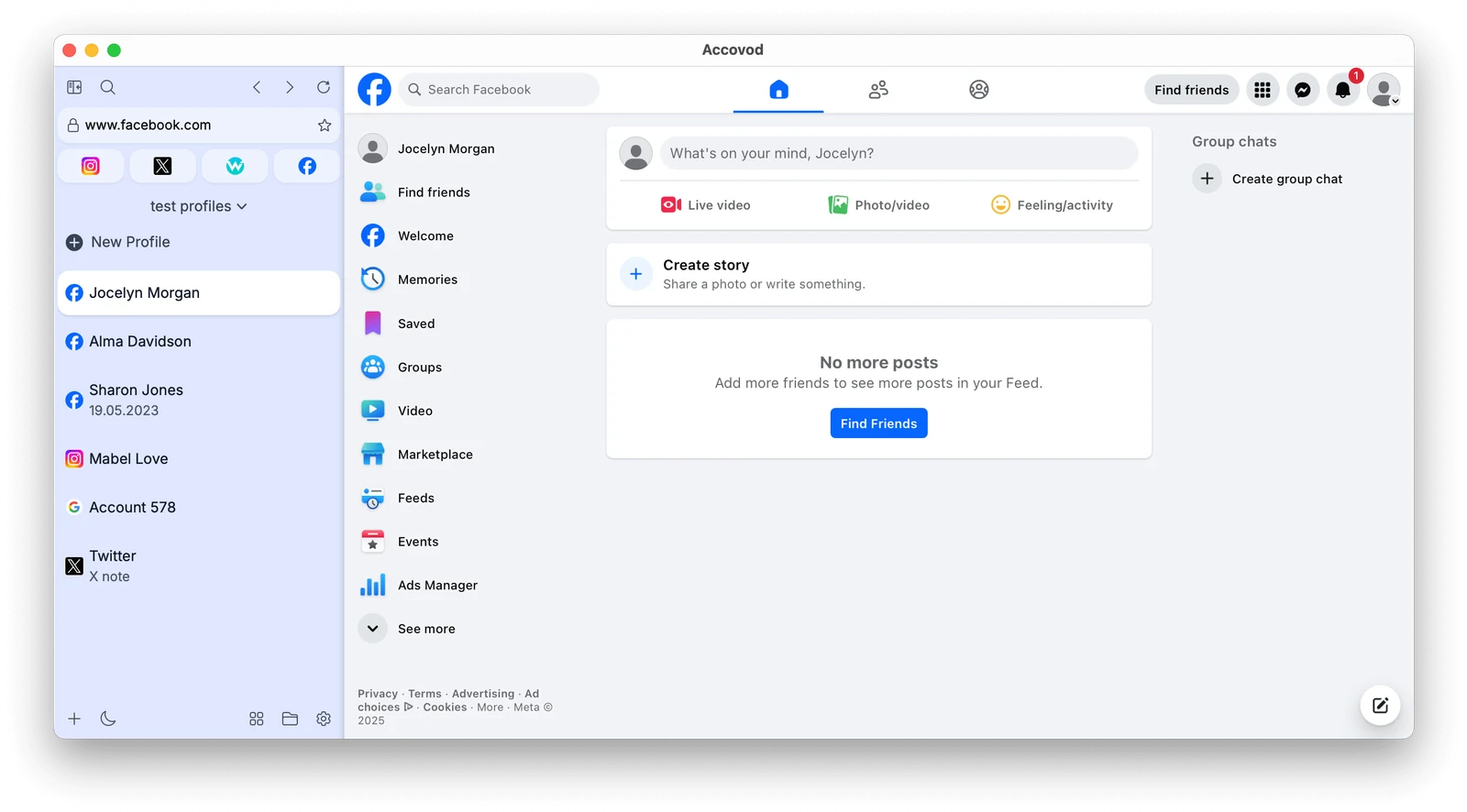
To set up a profile for an account:
- Click New Profile. Type the site in Platform, such as facebook.com or amazon.com, and the account name in Account.
- Paste a proxy (HTTP or SOCKS5) and click the check mark. Accovod tests it and shows the IP, the country and the Fraud Score.
- Click Add. The profile gets its own fingerprint, and its language and time zone are set to match the proxy.
- Log in to the account. If it already lives in another browser, you can move it with cookies in JSON format and skip the SMS code.
- Open a fingerprint checker in the profile once to see the result for yourself.
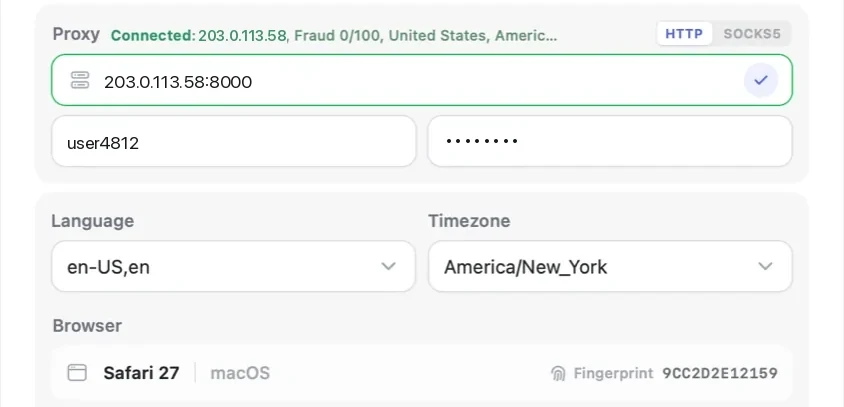
If your proxy uses a username and password, our proxy setup guide shows where each part goes. When a proxy goes down, pages in the profile stop loading. Accovod doesn’t switch to your real IP, so the account never shows up from your home connection.
Accovod costs from $15 a month with unlimited profiles.
FAQ
What are browser fingerprinting attempts?
Firefox blocks known fingerprinting scripts and counts them in its privacy protections report, and Safari limits what such scripts can read. Each attempt is a script on a page that tried to read values like canvas or your font list. Blocking helps with ad tracking, but it doesn’t keep your accounts apart if they share cookies and an IP.
Does a VPN change my browser fingerprint?
No. A VPN changes your IP address and nothing else. Your screen, fonts, graphics card and browser version stay exactly the same, so a site can still recognize the browser.
Can two profiles on one computer have different fingerprints?
Yes, if the browser is built for it. Regular browser profiles on one computer share the same fingerprint. In an antidetect browser like Accovod, each profile gets its own fingerprint, along with its own cookies and proxy.
Is browser fingerprinting legal?
Sites use it widely, mostly for fraud protection and login security. Privacy laws in some countries treat it like cookies for advertising purposes and require consent. For someone who runs several accounts, the practical question is how to keep them separate, not whether sites are allowed to look.
Can I block browser fingerprinting completely?
Not really. A browser has to share some of these values for pages to work, and blocking everything makes your browser rarer and easier to spot. Separate, consistent fingerprints for each account work better than trying to hide.
What to remember
- If you have two or three accounts on one site, give each one its own profile with its own proxy instead of logging in and out in one browser.
- If you have ten or more, add profiles to groups by client or project, and test each new profile in a fingerprint checker before the first login.
- If a team works in the same accounts, share the profiles instead of passwords, so the site keeps seeing the same fingerprint and IP.
- Whatever the number, don’t change fingerprints and proxies on an account that already works. Stable values look normal.