Antidetect browser for affiliate marketing: how to keep ad accounts separate
An antidetect browser for affiliate marketing keeps your ad accounts, farm accounts and bought accounts from being linked. In a regular browser they share one IP and one fingerprint, so a ban on one account leads the platform to the rest. An antidetect browser gives every account its own profile with separate cookies, a proxy and a fingerprint.
Contents
- Why use an antidetect browser for affiliate marketing
- How platforms link ad accounts
- Which proxies to use for ad accounts
- How to warm up ad accounts and log in to bought ones
- How to switch between dozens of ad accounts
- How to share ad accounts with your team without passwords
- How to compare antidetect browsers for affiliate marketing
- How to set up Accovod for ad accounts
- Common questions
- Cheat sheet
Why use an antidetect browser for affiliate marketing
Most affiliates who pay for traffic run ads on Facebook, TikTok or Google and send people to an offer from a CPA network. This is media buying, sometimes called traffic arbitrage. If the model is new to you, our guide to affiliate marketing for beginners explains how the money works.
One ad account is rarely enough. Media buyers keep separate accounts for different offers and countries, have backups ready in case of bans, buy farmed accounts or rent agency ad accounts, and warm new ones up before launch. A small team quickly ends up with dozens of accounts.
Facebook, TikTok and Google look for people who come back with new accounts after a ban, and they shut those accounts down in batches. When every account opens in the same Chrome on the same computer, the accounts share an IP, cookies and a browser fingerprint, and linking them is easy. After one ban, the clean accounts often go down with it.
An antidetect browser puts each account in a separate profile. Every profile has its own cookies, storage, proxy and fingerprint, so to the platform the accounts look like different people on different computers. A ban on one account no longer pulls the others in through a shared IP or shared cookies.
Accovod is our antidetect browser for people who run many accounts. It works on Windows and Mac, and cloud profiles also open on iPhone and iPad. Below, we use it to show how all of this works day to day.
How platforms link ad accounts
Platforms remember where each account logs in from and which browser it uses. When that data matches across several accounts, the platform decides they have one owner.
| What the platform sees | How it links accounts | What a separate profile changes |
|---|---|---|
| IP address | Accounts that log in from the same address look like one person’s | Each profile has its own proxy |
| Cookies and site storage | The browser keeps traces of past logins, including the banned account | Each profile keeps its own cookies, and other profiles can’t see them |
| Browser fingerprint: screen, graphics card, fonts, canvas | The same fingerprint on different accounts points to one computer | Each profile gets a unique fingerprint |
| Language and time zone | A US IP with a European time zone and language looks odd | Language and time zone follow the proxy country |
Besides browser data, platforms link ad accounts by a shared payment card, phone number, domain and identical creatives, so media buyers avoid repeating those across accounts too.
You can check whether a profile looks spoofed on Pixelscan and BrowserScan. Accovod profiles pass both checks, and two profiles on the same computer get different fingerprints.
Which proxies to use for ad accounts
Each account needs its own proxy, ideally a static one. If an ad account logs in from Warsaw today and from Texas tomorrow, the platform will assume it was hacked and ask you to verify your identity.
Media buyers usually pick from three types of proxies.
- Mobile proxies route traffic through cell carriers. Thousands of real phone users share each of these IPs, so platforms are careful about banning them. They are the usual choice for Facebook and TikTok, but they also cost the most.
- Residential proxies use addresses from home internet providers. Media buyers use them for farming and for ad accounts when mobile proxies cost too much.
- Datacenter proxies are the cheapest. Platforms recognize them from public databases, so they are rarely used for ad accounts.
Choose the proxy country by the account. For a bought account, that’s the country where it lived before you bought it. For a new one, it’s the country you registered it for.
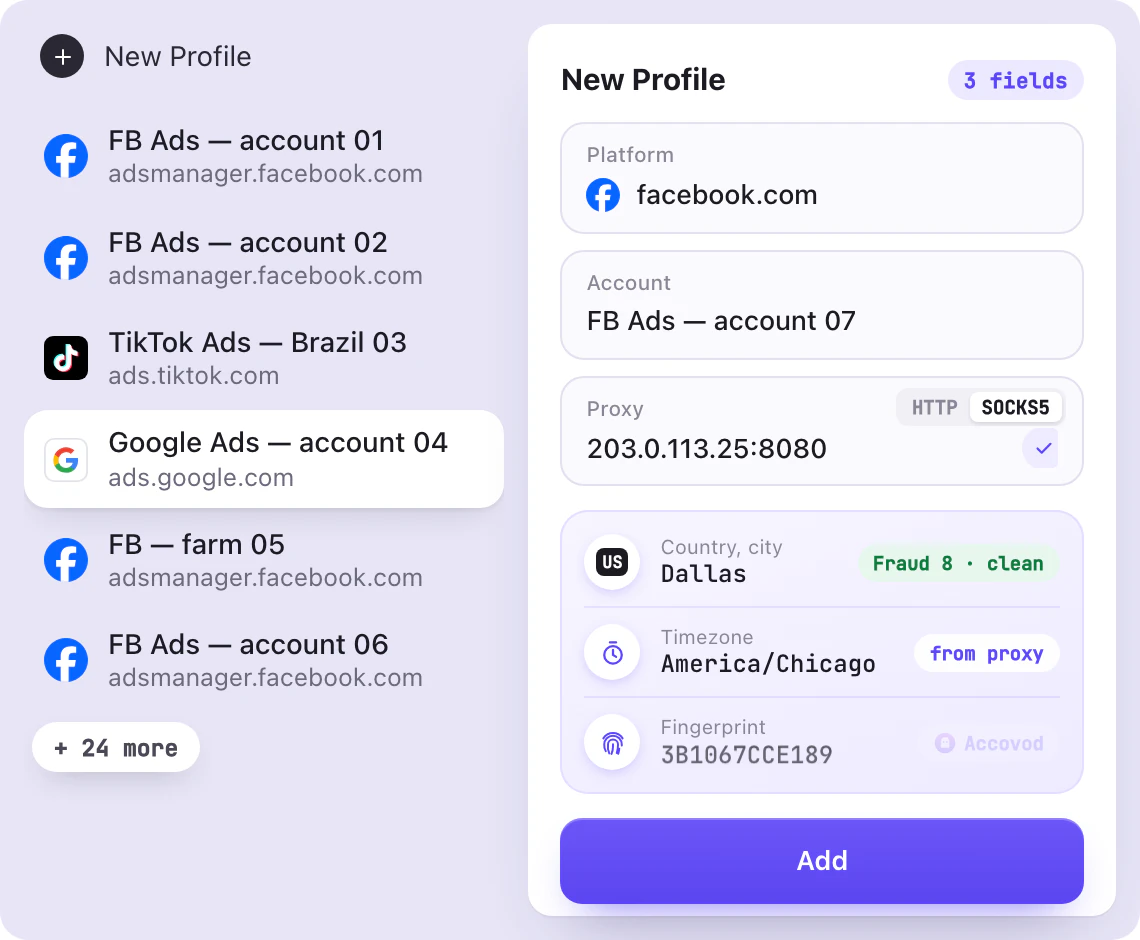
In Accovod, you paste the proxy right into the profile form, and both HTTP and SOCKS5 work. The app checks it on the spot and shows the IP, country and Fraud Score, a rating of how often the address shows up in spam and proxy databases. That way you see a dirty proxy before the first login. The proxy setup guide shows how to add proxies with a username and password.
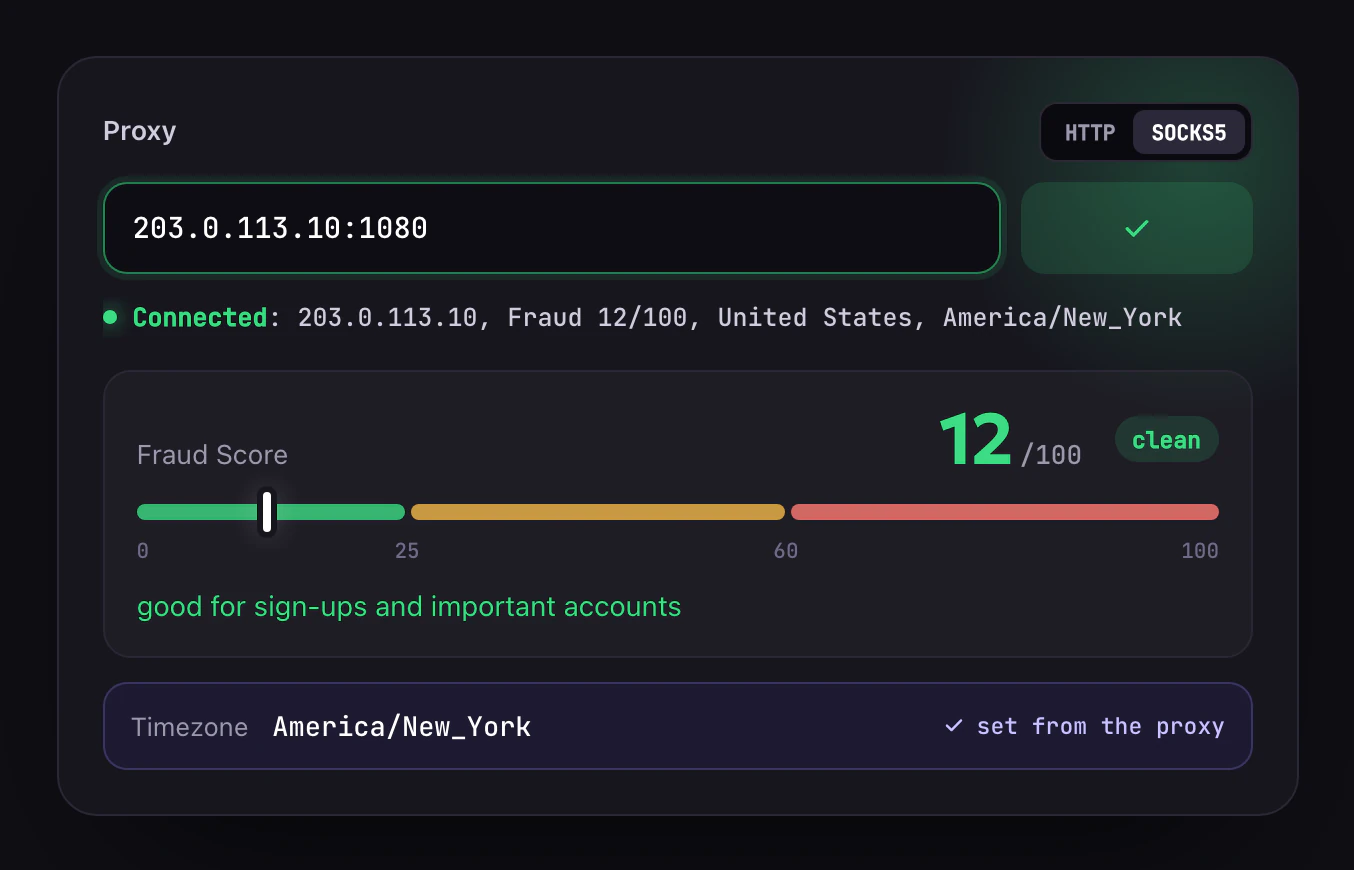
If a proxy goes down, pages in the profile simply stop loading, and Accovod won’t open them through your home connection. Your ad account never shows up on your real IP.
How to warm up ad accounts and log in to bought ones
Platforms look hardest at new accounts that start running ads on day one. That’s why media buyers warm them up first. For a few days they log in from the same proxy, fill out the profile, scroll the feed and visit ordinary sites so the account builds some history. Done at scale, this is called account farming. Ads come later, starting with a small budget.
Warm-up only works if the account stays in one profile the whole time. If you warm it up in one browser and run ads from another, the platform sees a login from a new device, and part of that work is lost.
In Accovod, you can tick Run Walker when you create a profile. The profile then goes through a list of sites on its own and collects cookies and history while you prepare the creatives.
Bought accounts are most often lost on the first login, when the new owner signs in with a username and password from a new IP. The platform sees an unknown device and will likely ask for verification. That’s why media buyers open bought accounts with the seller’s cookies. To the platform, this looks like the old session continuing. In Accovod, you paste these cookies in JSON format and pick a proxy in the country where the account lived before. Our guide on how to buy Facebook accounts covers what to check before you pay.
How to switch between dozens of ad accounts
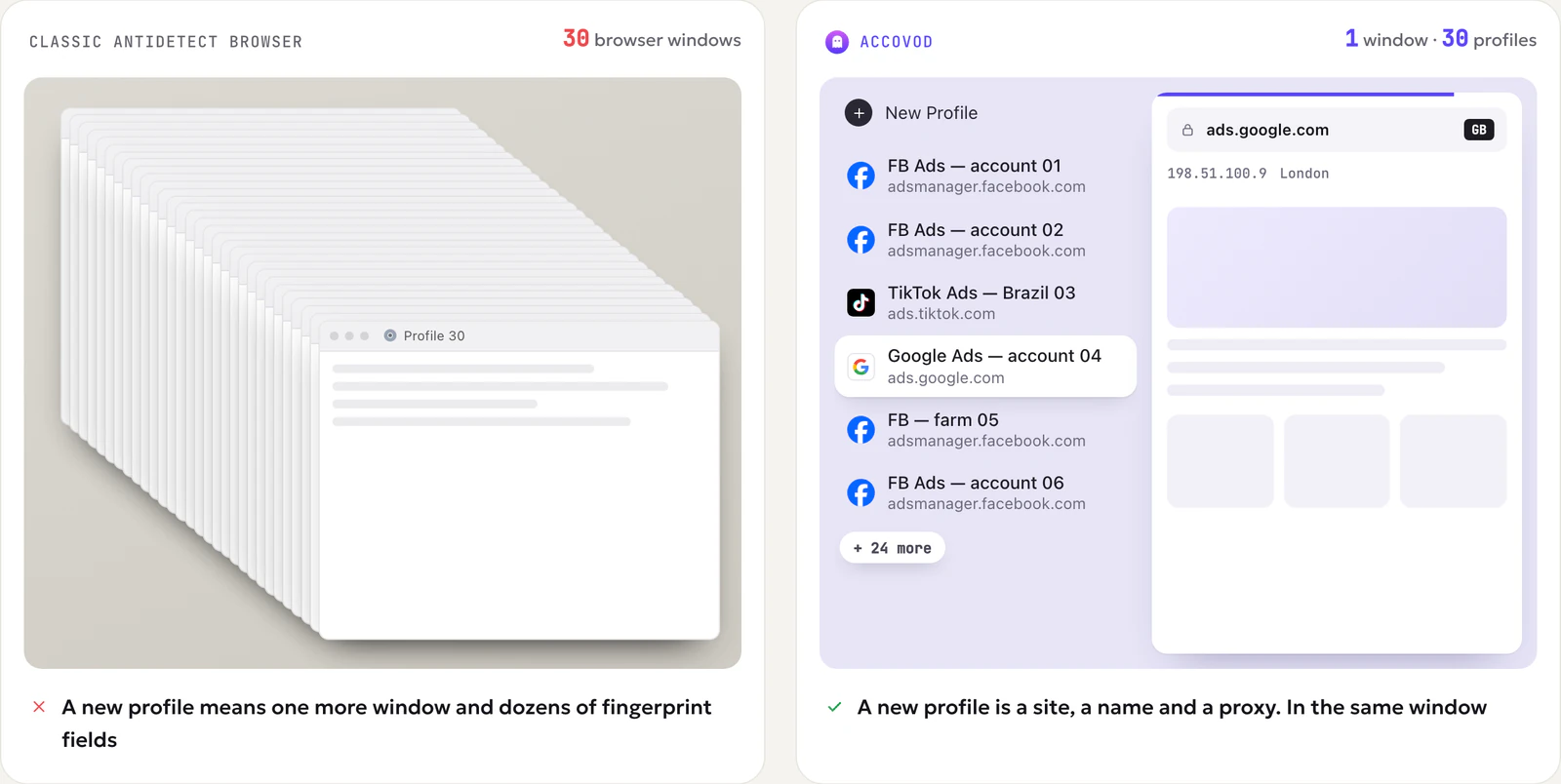
With dozens of ad accounts, a lot of time goes into finding the right one. Popular antidetect browsers open each profile in its own browser window. Twenty open ad accounts means twenty windows, and you end up hunting for the right one in the taskbar.
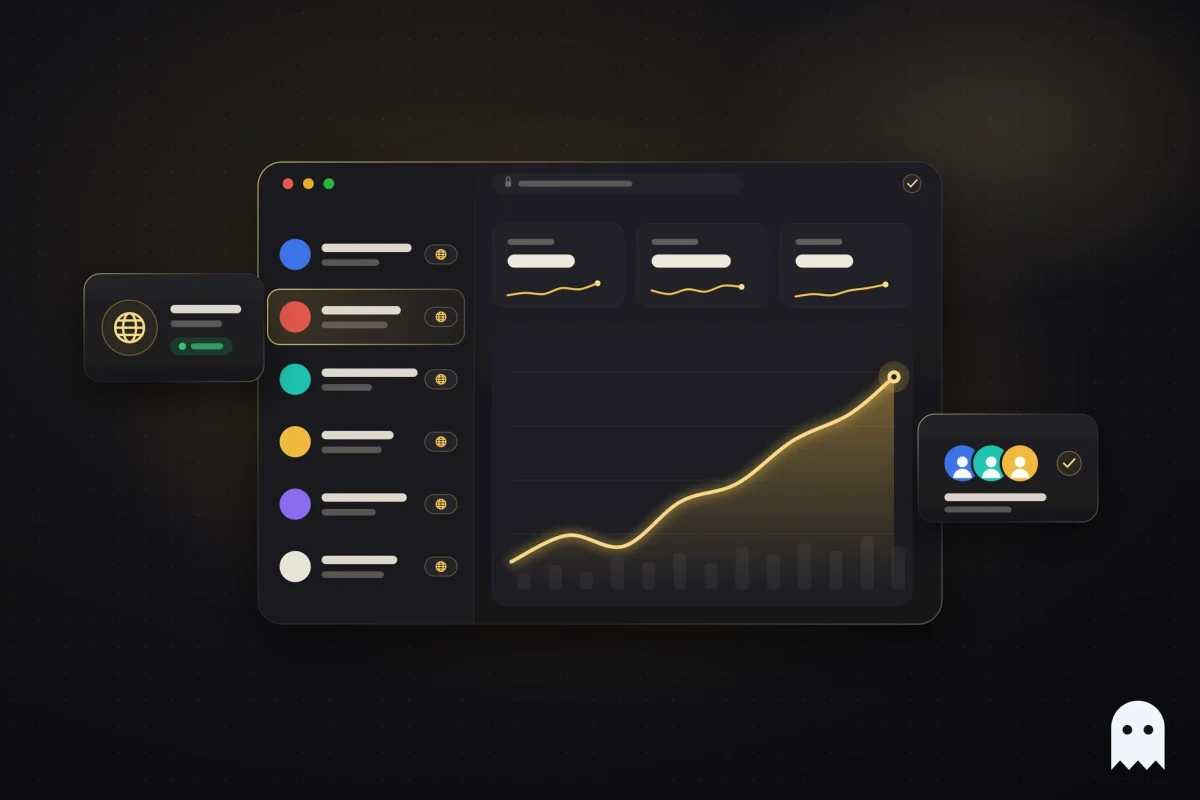
In Accovod, all profiles sit as a list in one window, and you switch between them in one click, like tabs. You can sort profiles into groups by offer, country or client and keep the offer, country or warm-up day in the profile note. On Windows, a group of 100 profiles opens in under a second.
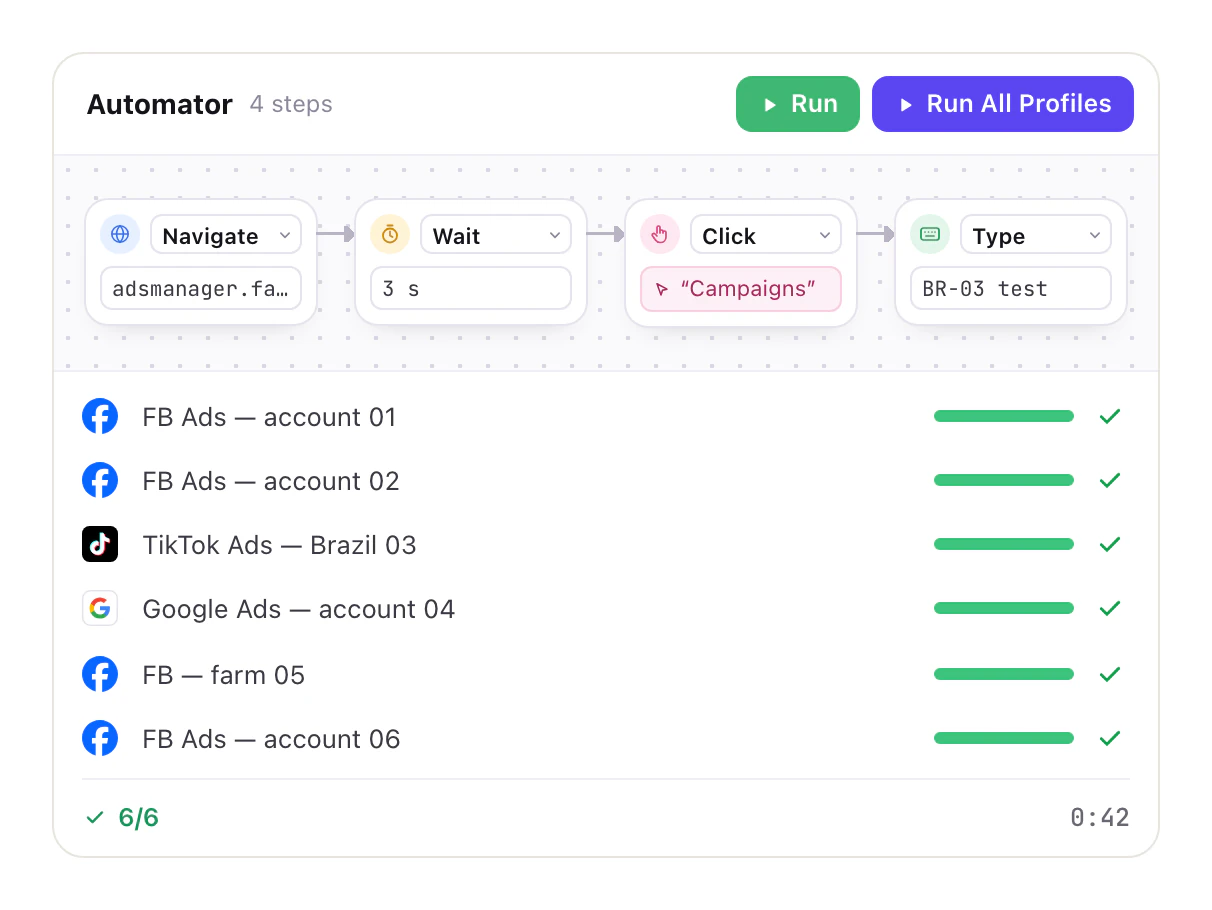
Repetitive work can go to automation. The Synchronizer on Windows repeats your clicks in several profiles at once, and Automator runs chains of actions with no code. Through the local API and the MCP server, your own script or an AI agent in Claude Code, Codex or Cursor can control profiles and pages.
How to share ad accounts with your team without passwords
In a media buying team, several people work in the same ad accounts. A farmer prepares and warms up accounts, a media buyer launches campaigns, and a team lead watches spend. When passwords get passed around, the platform sees logins from different computers and cities. The account hits a checkpoint, the SMS code goes to whoever owns the phone number, and work stops until someone forwards it.
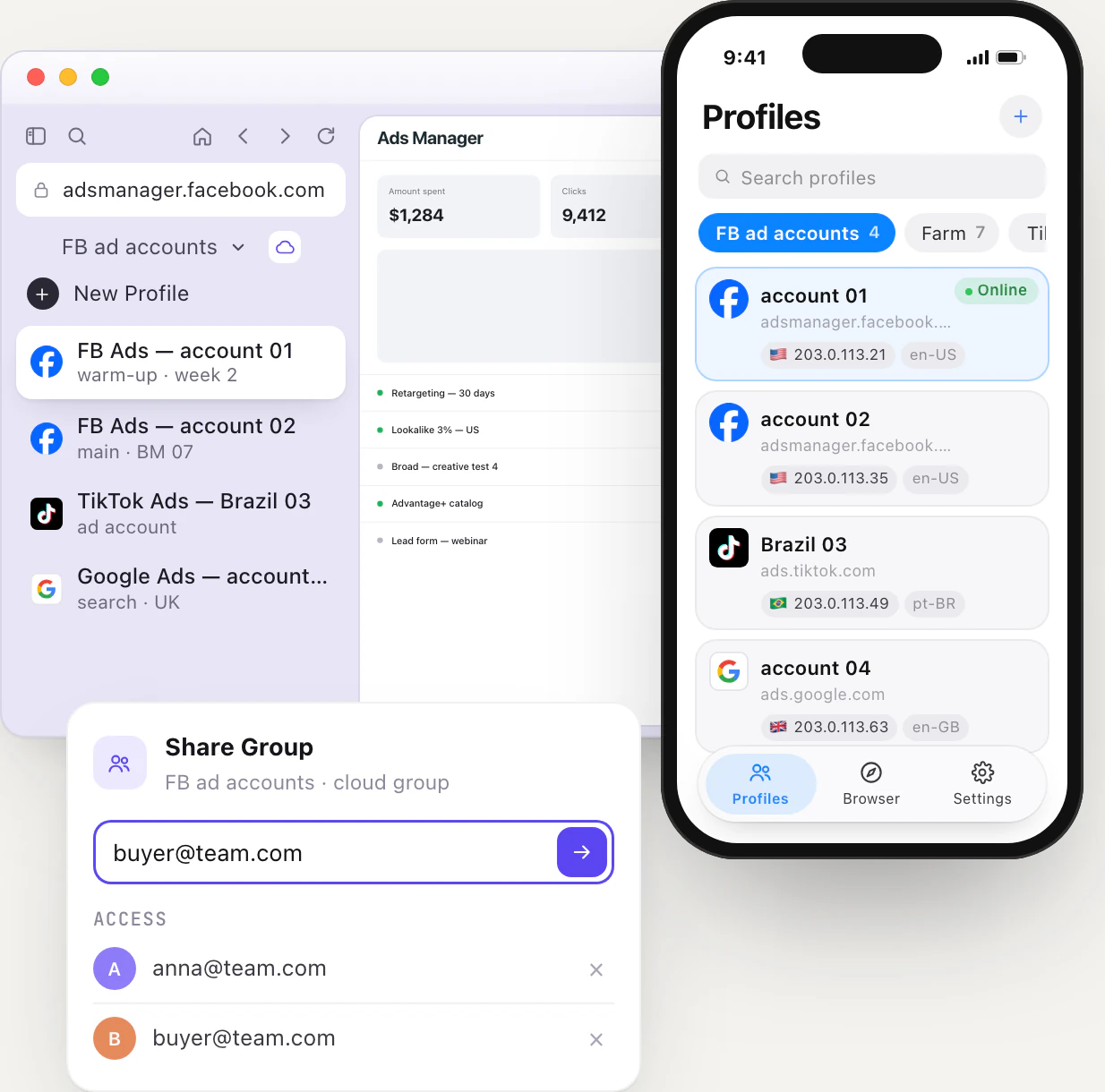
With Accovod, nobody has to hand over passwords. Add the profiles to a cloud group and share it with a teammate by email. They get the same accounts with the same cookies, proxy and fingerprint, but never see the passwords. To the platform, the IP and fingerprint stay as they were, as if the owner had logged in again. When someone leaves the team, remove their email from the group, and their access is gone. The teamwork guide shows how to set it up.
Cloud groups sync between Windows, Mac and iPhone, so you can check spend or reply to a comment on an ad from your phone.
How to compare antidetect browsers for affiliate marketing
Antidetect browser websites promise almost the same things, so test each browser on your own tasks.
- Check the fingerprint. Create two profiles with proxies and open Pixelscan and BrowserScan in each. A good browser passes both checks, and the two profiles get different fingerprints.
- Look at how proxies work. It helps when you can add and check a proxy right in the profile, and when the language and time zone follow the proxy country.
- Open 20 to 30 profiles at once. You’ll see whether switching between them is quick and whether your computer starts to slow down.
- Share a couple of profiles with a teammate. Check that they can work without your passwords and that you can take access back easily.
- Move one bought account over with cookies. If it opens without a password or an SMS code, the rest will move the same way.
- Price out your real number of profiles. Many antidetect browsers raise the price with every hundred profiles, so look at what you’ll pay once you have three times as many ad accounts, not at the starting price.
How to set up Accovod for ad accounts
Here’s how to add a new ad account in Accovod.
- Click New Profile. Enter the platform, for example facebook.com or tiktok.com, and a name you’ll recognize in the list.
- Paste a proxy from the account’s country and click the check mark to test it.
- If the account is new, tick Run Walker so it builds some history before you launch ads.
- Click Add and log in to the account. A bought account, or one from another antidetect browser, moves over with cookies in JSON format, with no password or SMS code.
- Put the profile in the right group. If a team works with that group, make it a cloud group and share it.
Accovod costs from $15 a month with unlimited profiles. You can pay by card or in crypto.
Common questions
What is the best antidetect browser for affiliate marketing?
It depends on how many ad accounts you run and who works with them. A solo media buyer with ten accounts cares most about speed and price, a team needs shared access without passwords, and a farm needs warm-up and automation. Either way, check the profiles in Pixelscan and BrowserScan and price out the number of profiles you expect to have in six months. We built Accovod for teams with dozens of ad accounts. It has shared access without passwords and Walker for warm-up, and all profiles open in one window.
Is there a free antidetect browser for affiliate marketing?
Most antidetect browsers have a free plan, but it usually covers only a few profiles. That’s enough to test a browser, not to run a batch of ad accounts. In Accovod, the number of profiles isn’t limited even on the cheapest plan.
Do I need a proxy for every ad account?
You need a separate profile with its own proxy for every account you log in with. Several ad accounts inside one Facebook Business Manager (BM) or one TikTok Business Center can stay in one profile, because the platform already knows they have the same owner. Separate personal accounts, BMs and new accounts each go into their own profile.
How do I move ad accounts from another antidetect browser?
Export each account’s cookies in JSON format from your old browser or with the Cookie-Editor extension. Then create a profile in Accovod with the same proxy and paste the cookies in. The account opens already logged in, with no password or SMS code.
Can I manage ad accounts from my phone?
Yes. Accovod has an app for iPhone and iPad on the App Store. It opens your cloud profiles with the same cookies and proxies as on your computer, so you can check spend, reply to comments or pause an ad when you’re away from your desk.
Cheat sheet
- If you run two or three ad accounts, give each one its own profile and proxy from day one anyway. Separating them after the first ban is too late.
- If you run dozens, sort profiles into groups, keep notes and hand the routine work to Walker, the Synchronizer and Automator.
- If you buy accounts, log in with cookies through a proxy from the country where the account lived, and warm them up before you launch ads.
- If a team works with you, share a cloud group instead of passing passwords around.