Buy Telegram accounts: what you get and how to keep them alive

It’s easy to buy Telegram accounts, and just as easy to lose them a week later. Instead of a username and password, the seller gives you a phone number and an account already signed in on their computer or phone. It becomes yours once you sign in yourself, log the seller out a day later and set your own password.
Go easy on the account for the first week and don’t send bulk messages, and Telegram won’t have a reason to treat you as a spammer.
Contents
- What you actually get when you buy a Telegram account
- What to check before you pay
- Logging in and the first days
- Why Telegram freezes and bans accounts
- Running several Telegram accounts in one window
- FAQ
- Cheat sheet
What you actually get when you buy a Telegram account
Telegram doesn’t use passwords the way most sites do. You sign in with your phone number and a code, so the seller gives you something that lets you get that code. It’s usually one of these three things.
- A phone number. When you sign in, the seller forwards you the code. These are often rented virtual numbers, and they work until the rental runs out.
- A tdata folder. This is Telegram Desktop’s data with the account already signed in. Put the folder next to the app, open Telegram Desktop, and you’re in.
- A session file with a JSON file next to it. These are made for programs that talk to Telegram directly, without the app. To use the account in a browser, you’ll still need a login code.
Accounts also differ by age. Fresh registrations are the cheapest. Aged accounts have been around for a while, and Telegram is less suspicious of them. You’ll also find accounts on numbers from specific countries and accounts with Telegram Premium.
The cheaper the account, the more likely it’s on a temporary number and has been sold before. So before you buy a Telegram account at the lowest price, think about whether you need it for a week or for the long haul.
What to check before you pay
Ask the seller a few questions before you pay. The answers tell you whether you’ll be able to sign in and whether the account will still be yours a month from now.
- How you’ll sign in: with a number and code, a tdata folder or a session file. For browser work, tdata or a number that can receive a code is the easiest.
- Whose number it is and how long it will keep working. If the number was rented for 20 minutes, there won’t be a second SMS code, and the account stays yours only until you sign out.
- Which country the number is from. You’ll get a proxy from the same country.
- Whether the account has a cloud password. If it does, you can’t sign in from a new device without it, so ask the seller to send it.
- How old the account is and whether Telegram has ever limited it for spam.
- Whether they’ll replace the account if it doesn’t open the first time.
If the seller doesn’t know the number’s country or won’t answer about the cloud password, buy from someone else.
Logging in and the first days
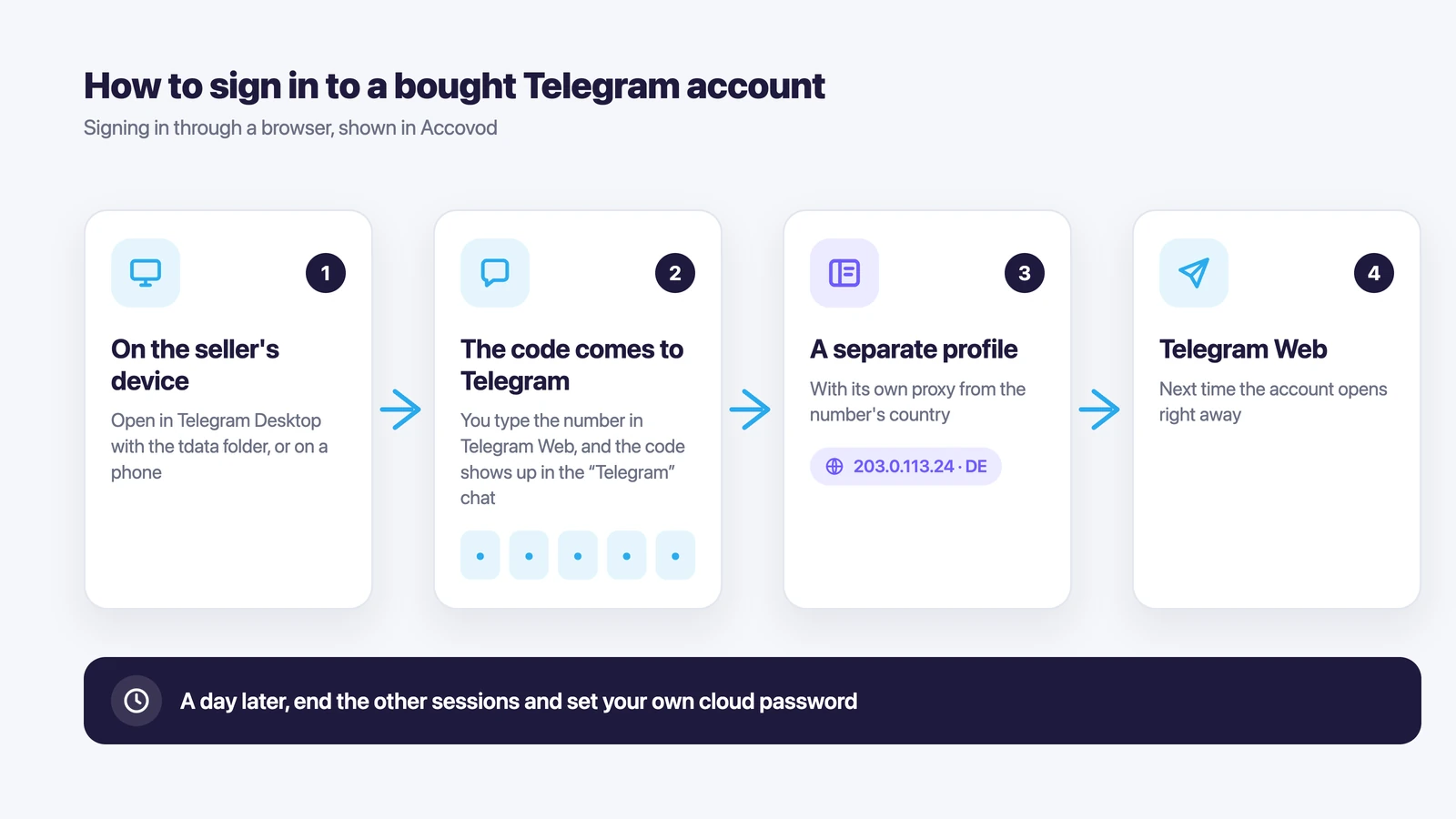
On a computer, the handiest place for a bought account is Telegram Web (web.telegram.org). Open it in a separate browser profile with its own proxy, and the account signs in from its own IP and never crosses paths with your other accounts.
Signing in takes a couple of minutes.
- Create a separate browser profile for the account and add a proxy from the number’s country.
- Open web.telegram.org and choose to log in with a phone number.
- Enter the number. The code shows up in the “Telegram” chat wherever the account is already open, for example in Telegram Desktop with the tdata folder. If it isn’t open anywhere, the code goes out by SMS and the seller forwards it to you.
- If Telegram asks for a cloud password, enter the one the seller gave you.
When you open tdata in Telegram Desktop, add a proxy from the same country there too (Settings → Advanced → Connection type). Otherwise the account’s first sign-in after the sale comes from your home IP.
If the seller handed the account over on a phone, you can also sign in with a QR code. Telegram Web shows the code, and you scan it in Telegram on that phone (Settings → Devices → Link Desktop Device).
Most buyers want to kick the seller out right away, but that won’t work yet. Telegram doesn’t let you log out other devices from one that signed in less than 24 hours ago. So on day one, just use the account: read a few channels and fill in the profile if it’s empty.
Once a day has passed, do four things.
- Open Settings → Devices and end every session that isn’t yours. After that, neither the seller nor anyone they might have shared the account with can get back in.
- Set your own cloud password and a recovery email (Settings → Privacy and Security → Two-Step Verification). If the seller set a password, change it.
- In Privacy and Security, find the option that deletes your account if you’re away and pick the longest period. If you leave it alone, Telegram deletes an account nobody has signed in to for 18 months.
- If you need the account for the long haul and its number is temporary, switch it to your own number (Settings → tap your number → Change Number). Wait a few days first, until the account gets used to its new location.
For the whole first week, skip bulk messaging, don’t add people to groups in batches and don’t send strangers the same text. People report messages like that, and reports get the account limited.
Why Telegram freezes and bans accounts
Most bought accounts are lost because of spam reports. Telegram’s Terms of Service ban spam and scams, and they don’t say anything about buying or selling accounts.
After reports come in, Telegram limits the account first. It can then only message people who have its number saved in their contacts. To see whether your account is limited, ask Telegram’s official @SpamBot.
If the violation is serious, Telegram freezes the account. It can still read chats, but it can’t send messages or post. You can appeal right in the app, and if Telegram got it wrong, the account is unfrozen. The Telegram FAQ has more on this.
Telegram may also ask you to confirm a sign-in when an account suddenly shows up from another country. A week in Germany followed by a login from Brazil looks like a hacked account. So keep the same proxy on an account that works, and if the proxy dies, get a new one in the same country.
Running several Telegram accounts in one window
One or two accounts are fine in separate browsers. Past that, it’s easy to lose track, and that’s why we built Accovod, a browser for people who run many accounts. Each account lives in its own profile with its own cookies, proxy and fingerprint, so to Telegram they look like different browsers. All profiles sit as a list in one window, and you switch between accounts in one click, the way you switch tabs.
Adding a bought account takes three steps.
- Click New profile. Type web.telegram.org in the Platform field and a name or number in the Account field, so you can spot the account in the list later.
- Paste a proxy from the number’s country (HTTP or SOCKS5) and click the check mark. Accovod shows the IP, its country and Fraud Score, and sets the profile’s language and time zone to match the proxy. The docs show how to set up a proxy in a profile step by step.
- Open the profile and sign in to Telegram Web with the number, as described above. The profile remembers the login, so next time the account opens right away.
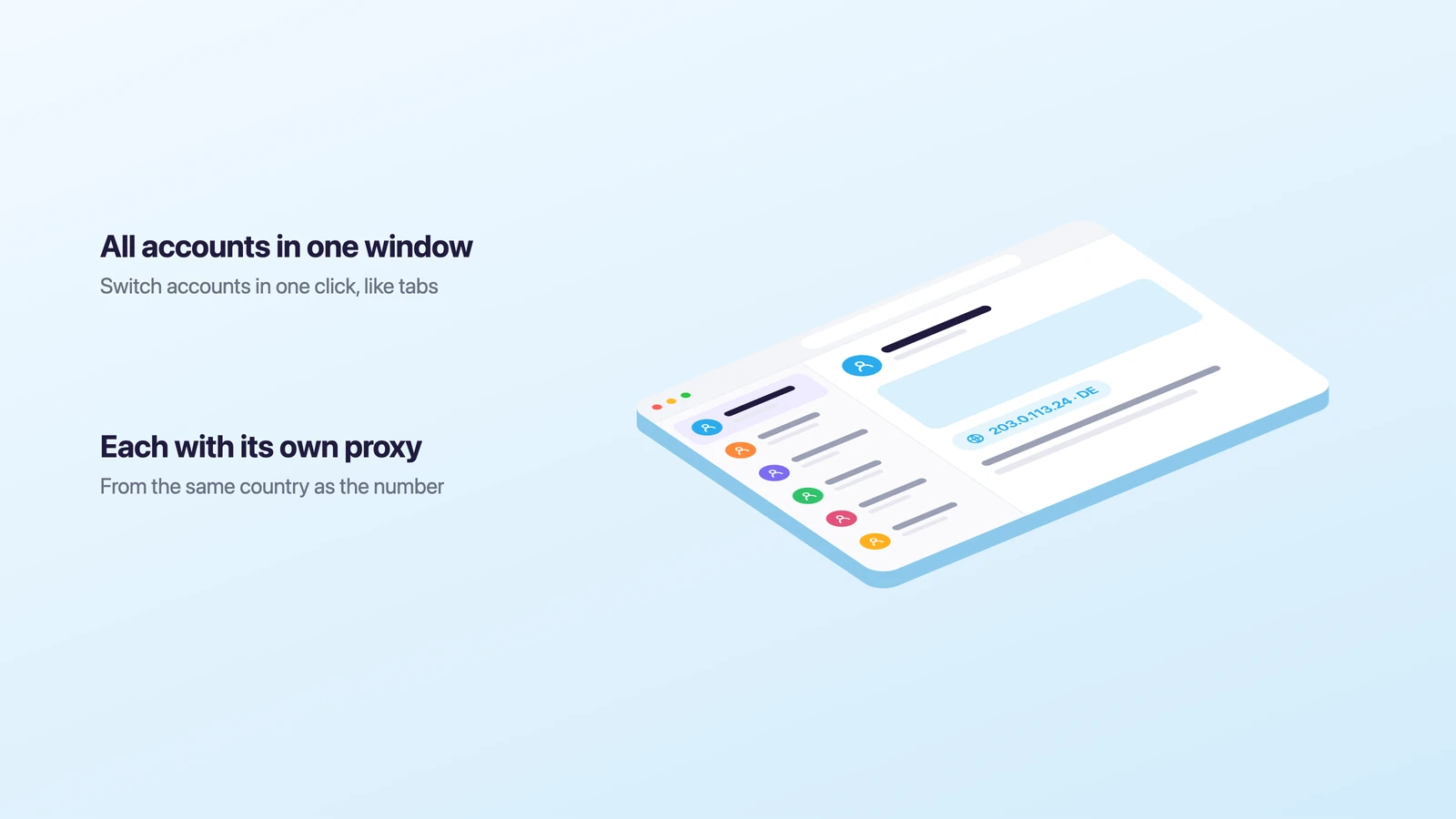
If a proxy stops working, pages in that profile just won’t load. Accovod doesn’t switch to your real IP, so an account never suddenly turns up in another country.
Accovod runs on Windows and Mac, and there’s an iPhone and iPad app on the App Store. Add the accounts you also want on your phone to a cloud group, and those profiles will be on both your computer and your iPhone. If teammates work with the accounts, share the cloud group with them by email, and you won’t have to forward codes and passwords.
You don’t have to warm up accounts by hand either. Walker browses sites inside a profile on its own, and Automator repeats routine actions for you without any code. For all the ways to have more than one Telegram account, see our guide to multiple Telegram accounts.
Accovod costs from $15 a month with unlimited profiles.
FAQ
Can you buy a Telegram account?
Yes. Telegram’s Terms of Service don’t mention buying or selling accounts. They do ban spam, scams and illegal content, and that’s what bought accounts usually get limited for. If an account sends the same message to strangers, Telegram restricts it like any other.
Can you have multiple Telegram accounts?
Yes. The Telegram apps let you add several accounts, and in a browser you can have as many as you have profiles. Accounts in the same browser share an IP and a fingerprint, though, so give each one its own profile with its own proxy.
How do I log in to Telegram Web on a computer?
Open web.telegram.org and either scan the QR code with Telegram on your phone or enter your phone number and the code Telegram sends to the app where you’re already signed in. Our guide to Telegram Web on a computer walks through both.
Can I get a Telegram account without a SIM card?
Yes, Telegram itself has a way. Fragment sells virtual +888 numbers, and the login code for one of those arrives on Fragment instead of by SMS. These numbers only work in Telegram.
Why did Telegram ban my number?
Most likely people reported the account for spam: bulk messages, the same text sent to strangers, or adding people to groups in batches. Check with @SpamBot, and if the account is frozen, appeal in the app.
How long does a Telegram ban last?
Telegram doesn’t say. A limited account can still message people who have its number saved in their contacts, and a frozen account stays read-only until an appeal goes through.
Cheat sheet
- If you have one account, give it its own profile with a proxy from the number’s country, then a day later end the other sessions and set your own cloud password.
- If you have ten or more, do the same for each one. All the profiles sit in one window, each with its own proxy, and Walker can handle the warm-up.
- If teammates work with the accounts, share a cloud group with them by email and agree that only one person opens a profile at a time.
- If Telegram limits an account, check it with @SpamBot and stop messaging strangers for a while.