Twitter shadowban: what it means on X and how to check

A Twitter shadowban is when your posts stop reaching new people and X never tells you why. Your followers still see them, but search, the For you timeline and replies stop showing them. You can check this yourself in a few minutes: look for a label on your posts, then search for them while logged out.
Contents
- What a shadowban on X means
- How to check if you are shadowbanned
- Why X limits reach
- What to do: check the rules and appeal
- How to keep several X accounts apart
- FAQ
- Cheat sheet
What a shadowban on X means
A shadowban on X means your posts are still online, but fewer people can find them. X calls this limiting post visibility. Its page on how X enforces its rules lists what a limit can include:
- the post is left out of search results, trends and recommended notifications;
- the post is removed from the For you and Following timelines;
- the post can only be found on your profile;
- the post is shown lower in replies;
- likes, replies, reposts and quotes on the post are restricted.
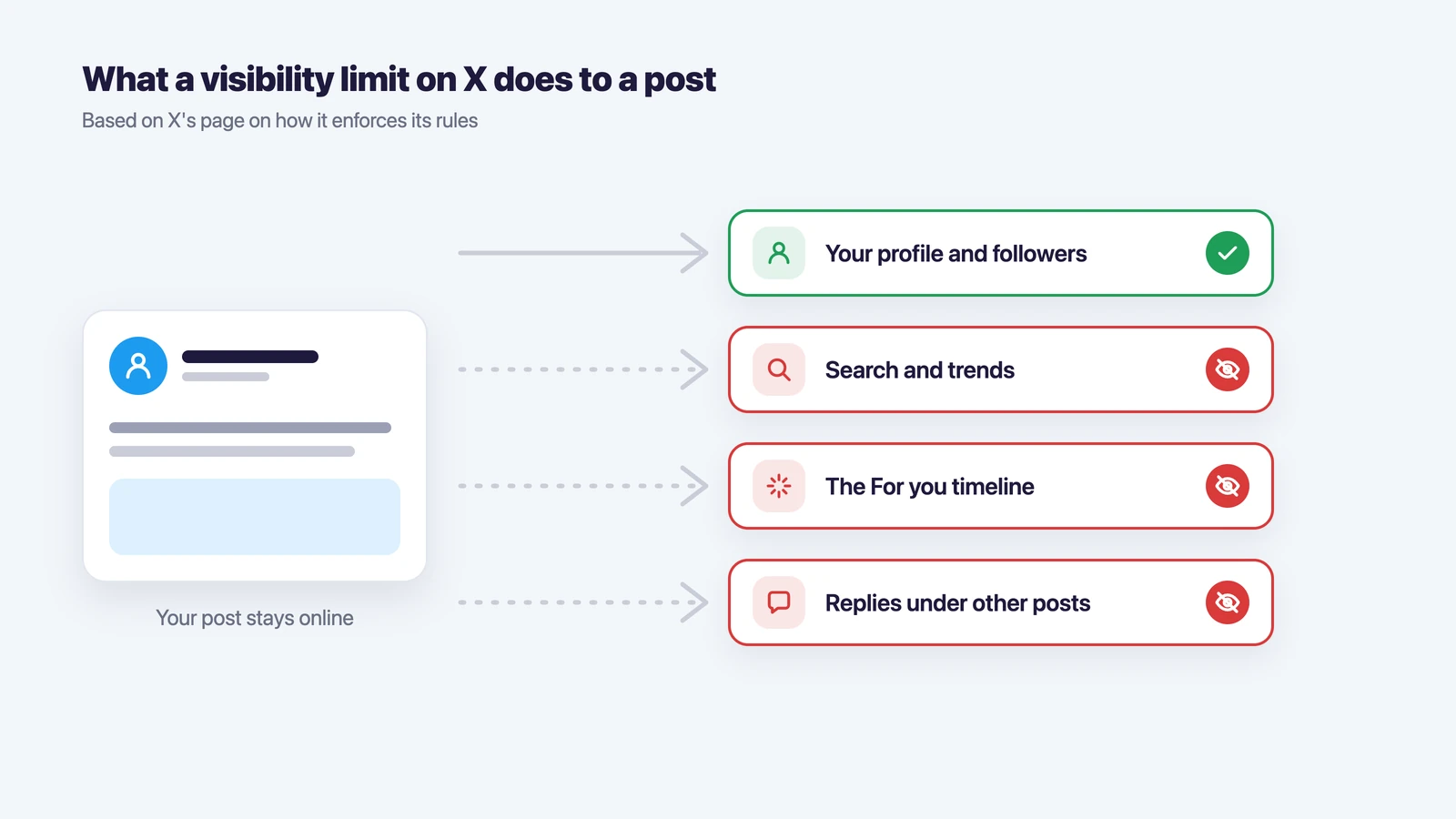
X adds that posts limited this way get a label, visible to you and to readers, and that you can appeal the label. So a real limit usually leaves a trace on the post itself. A drop in views without any label is more often a normal change in reach than a penalty.
Account-level measures are a different thing. X can put an account in read-only mode for a while, ask you to confirm a phone number or email, or suspend it. Those you notice right away, because X shows a message when you log in.
How to check if you are shadowbanned
You can check if you are shadowbanned on X yourself in a few minutes, and you don’t need a third-party tool for it. Do the checks from a browser where you are logged out or logged in to a different account, so X doesn’t show you your own posts by default.
- Look for labels. Open your recent posts and see whether any of them has a notice that its visibility was limited.
- Search for your handle. Type your @username into X search from another account. If your account shows up, search isn’t blocked.
- Search for an exact phrase. Copy a sentence from a recent post, put it in quotes and search for it under Latest. If the post doesn’t appear while others from the same hour do, it may be excluded from search.
- Check replies. Reply to a busy thread, then open that thread from another account. If your reply sits at the very bottom behind “Show more replies”, it has been pushed down.
- Compare analytics. Open the post’s analytics and compare views with your usual numbers. A sharp drop across all posts at once, together with the signs above, points to a limit rather than a weak post.
Shadowban checker sites run roughly the same searches from their side. They can show whether your account turns up in search, but they don’t have access to X’s moderation data, so treat their result as a hint, not a verdict.
| Sign | What it most likely means |
|---|---|
| A label on the post about limited visibility | X limited this post; you can appeal the label |
| Your posts don’t appear in Latest search from another account | Your posts are left out of search |
| Your replies are hidden under “Show more replies” | Replies are pushed down |
| Fewer views but everything shows up in search and replies | A normal change in reach, not a limit |
| A message about read-only mode or a locked account at login | An account-level measure, not a shadowban |
Why X limits reach
X limits reach when a post or an account breaks its rules, and most limits for ordinary users come from the authenticity policy. The policy names the behavior X treats as spam or manipulation:
- posting the same or nearly the same text again and again, or posting and deleting the same content;
- bulk, aggressive replies and mentions, and replies that have nothing to do with the original post;
- piling unrelated or trending hashtags onto posts to pull attention;
- following and unfollowing large numbers of accounts;
- buying, selling or trading likes, follows, reposts or the accounts themselves;
- running several accounts that like, repost or reply to the same posts to boost them.
Multiple accounts are allowed in themselves. X says you can run up to ten accounts for different purposes, including accounts you manage on behalf of clients as a social media manager. The problem starts when those accounts post the same content or push the same posts, or when a new account is made to get around an earlier suspension.
What to do: check the rules and appeal
If a post carries a label, appeal it from the post itself, as X describes on its enforcement page. If your account is suspended or locked, X lets you appeal through the app or by filing a report.
If there is no label but your reach is still down, these steps usually help:
- remove or edit posts that repeat each other, and stop reposting the same link without comment;
- drop the extra hashtags and the replies that only promote your own account;
- disconnect third-party apps you no longer use; X says you are responsible for the apps you let into your account;
- post as usual for a week or two and compare the numbers again.
Deleting your whole history or opening a fresh account usually makes things worse. X treats a new account made to get around an enforcement action as ban evasion and can suspend other accounts it links to the same person.
How to keep several X accounts apart
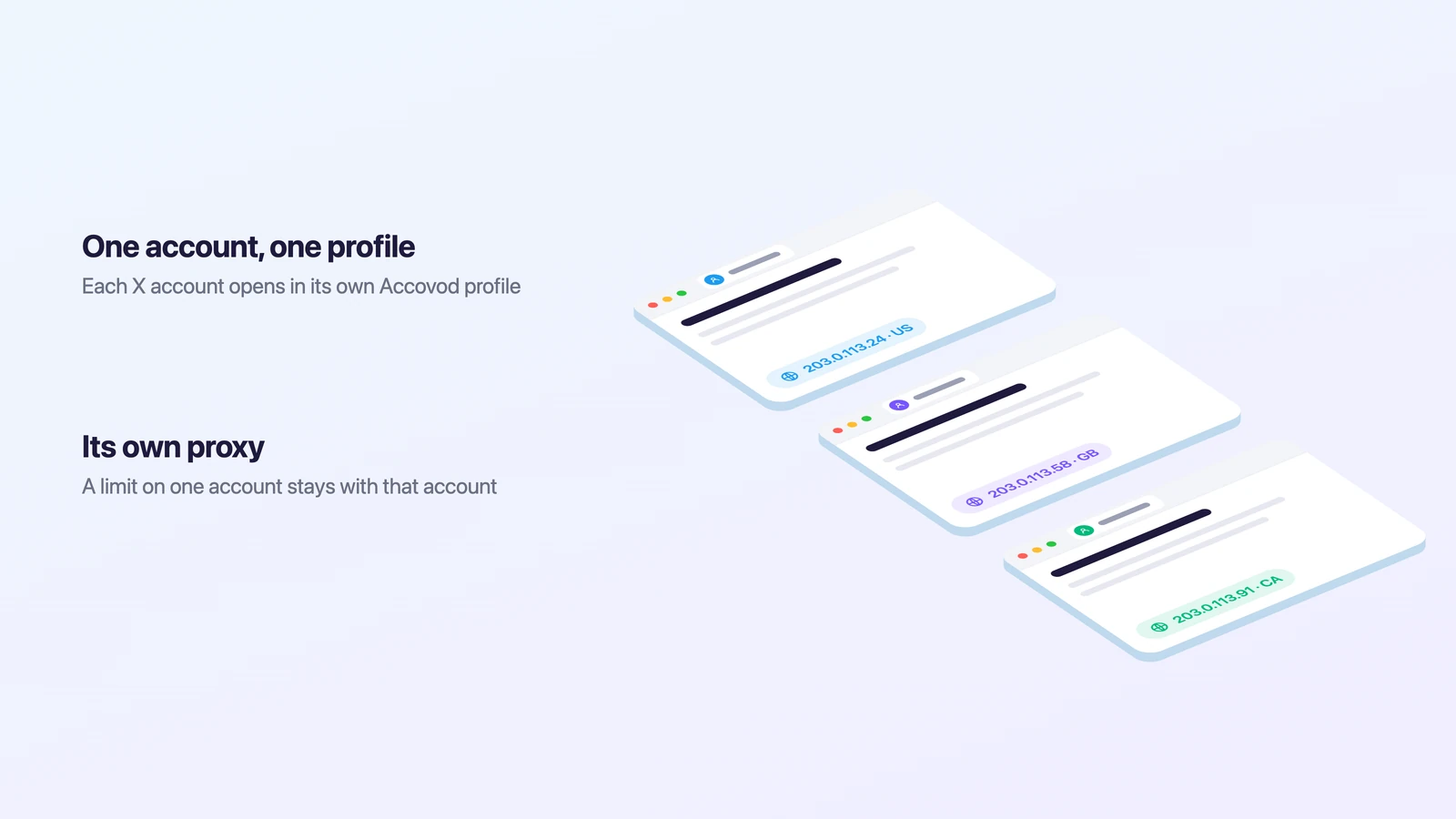
When you run accounts for several clients or projects, a limit on one should stay with that account. That is easier when the accounts don’t share a browser, cookies and an IP address, because then a problem with one account doesn’t pull the others into the same review.
Accovod is a browser for people who run several accounts. Each account gets its own profile with its own cookies, fingerprint and proxy, and all profiles sit in one window, so you switch between them in one click. Language and time zone in each profile follow its proxy.
- Click “New profile” and name it after the X account.
- Paste the account’s proxy (HTTP or SOCKS5) and click the check mark: Accovod shows the IP and country.
- Open the profile and log in to X once. Next time it opens already logged in.
- Repeat for every account, each with its own proxy.
If a teammate posts for the same clients, share a cloud group with them by email, as described in the teamwork guide. They open the accounts already logged in, and nobody passes passwords around. Our X login guide covers signing in from a browser.
FAQ
How do I know if I am shadowbanned on X?
Look for a label on your posts about limited visibility, then search for your handle and for an exact phrase from a recent post while logged out. If your posts don’t show up in Latest and your replies are hidden, your reach is limited.
How long does a Twitter shadowban last?
X doesn’t publish a fixed period. Limits on single posts stay until the post is removed or the appeal succeeds; read-only mode on an account is described as temporary.
Do shadowban checkers work?
They show whether your account appears in X search from the outside. They can’t see X’s moderation decisions, so use them together with the manual checks above.
Can I appeal a shadowban?
Yes, when X has labeled a post as limited: the label has an appeal option. Suspensions and locked accounts are appealed through the app or a report form.
Does deleting posts help?
Deleting posts that repeat each other or break the spam rules can help. Deleting your whole history doesn’t reset anything and won’t lift a limit X has already applied.
What about TikTok?
TikTok has its own signals and checks. We cover them in how to tell if you’re shadowbanned on TikTok.
Cheat sheet
- If you run one or two accounts, check labels and search, clean up repeated posts and give it two weeks before you judge.
- If you run ten accounts, make sure they post different content and never boost each other, and keep each one in its own profile with its own proxy.
- If a team works on the accounts, share profiles instead of passwords, so every login comes from the same profile and proxy.