TikTok web: how to log in on a computer


TikTok web is the browser version of TikTok on the TikTok website, tiktok.com, and it works on any computer without installing anything. You can watch, comment, reply to messages, upload videos and check your stats there. To post as a brand and as a client from the same computer, keep each TikTok account in its own browser profile.
Contents
- How to open TikTok web on a computer
- What you can do on TikTok web
- How to switch accounts on TikTok desktop
- TikTok web not working: common fixes
- FAQ
- Cheat sheet
How to open TikTok web on a computer
Open tiktok.com in Chrome, Edge, Safari or Firefox. The For You feed plays even before you sign in, but to comment, follow or post you need to log in.
The TikTok web login works like this:
- Click Log in in the top right corner.
- Pick a way to sign in: a QR code, a phone number, an email or username with a password, or the social account you signed up with, such as Facebook, Google or Apple.
- With a phone number, TikTok sends you a code by SMS. With an email or username, you type your password.
If you signed up with Facebook, Google or Apple, use the same button on the computer. A password login won’t work for an account that never had a password. The easiest way in is usually the one you used to sign up.
TikTok web login with a QR code
The QR code is the quickest option if the account is already on your phone, because you don’t type a password or wait for a code. Open the TikTok app on your phone, scan the code on your computer screen with the app’s scanner and confirm the login. A few seconds later, your account opens on the computer.
What you can do on TikTok web
The TikTok web version covers most of the daily work of an SMM manager. It isn’t a full copy of the app, though.
| Task | On TikTok web |
|---|---|
| Watch the For You and Following feeds | Yes |
| Like, comment, follow, share | Yes |
| Reply to messages and read notifications | Yes |
| Upload a finished video or photo post | Yes, through TikTok Studio |
| Write a caption, pick a cover, schedule a post | Yes, in the TikTok Studio uploader |
| See views, followers and per-video stats | Yes, in TikTok Studio |
| Watch LIVE | Yes |
| Record a video with the camera, add effects and filters | No, only in the app |
| Go LIVE | No, you need the app or TikTok LIVE Studio on a computer |
To post from a computer, click Upload or open TikTok Studio from your profile menu. Drag the video file into the window, write the caption, add hashtags and choose who can see it. The editor in the browser is basic, so finish the edit before you upload.
TikTok web is the best place for comments, replies and stats. Shooting and effects stay in the app.
How to switch accounts on TikTok desktop
To switch accounts on TikTok desktop, click your profile picture in the top right corner. If the menu lets you switch accounts, pick another account from the list or add a new one and log in to it. Not every account has this option on the web yet. Without it, you log out and log in to the other account.
Either way, only one account is active in the browser at a time, and a new login may ask for a code again. With a brand, two clients and your own account, that turns into a lot of codes every day.
There is also a second problem. In one browser, every account shares the same cookies, the same IP address and the same browser fingerprint. For TikTok, that’s one person on one device. If one of the accounts gets a ban, the others are easy to connect to it. This matters more as the number grows, and our guide on how many TikTok accounts you can have covers the limits.
Here is what people usually try, and why it falls short.
| What people try | What goes wrong |
|---|---|
| Switching accounts in the profile menu | Only one account is active at a time, and all accounts share one IP and one fingerprint |
| Logging out and back in | A new code on almost every login, plus the same shared IP and fingerprint |
| Incognito windows | The session is gone once you close the window, so you log in again every time |
| Chrome profiles | Cookies are separate, but the IP and the fingerprint are the same for every account |
| A VPN on the whole computer | All accounts move to one new IP together, which still links them |
What works is giving each account its own profile, with its own cookies, its own fingerprint and its own proxy.
This is what Accovod does. It’s a browser for people who run many accounts, on Windows and Mac, and cloud profiles also open in the app for iPhone and iPad. Every TikTok account lives in a separate profile with its own cookies, storage, fingerprint and proxy. The language and time zone follow the proxy’s country. All profiles sit in one list in one window, and you switch between accounts in one click, like tabs.
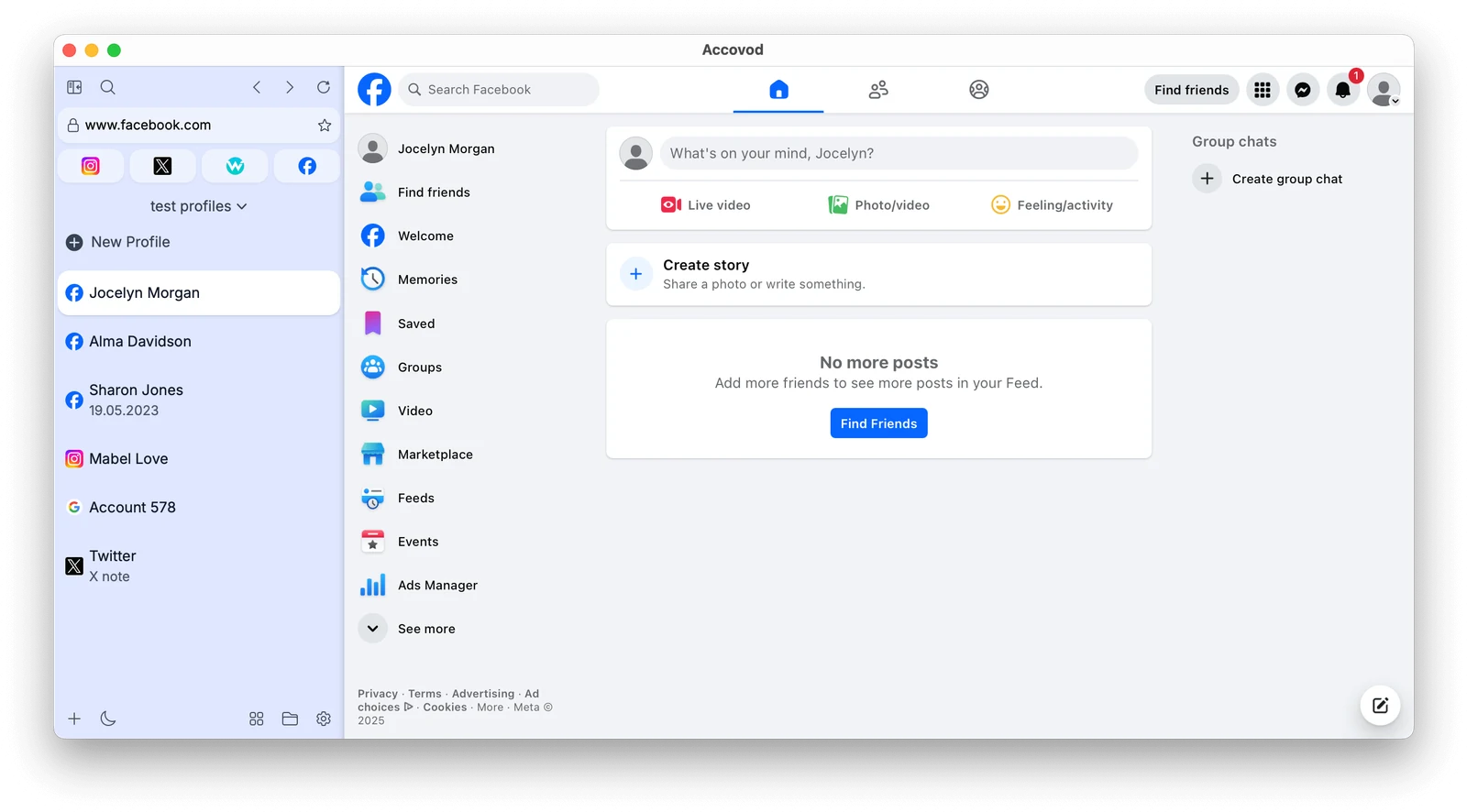
To set up a profile for a TikTok account:
- Click New Profile. Type tiktok.com in Platform and the brand or client name in Account.
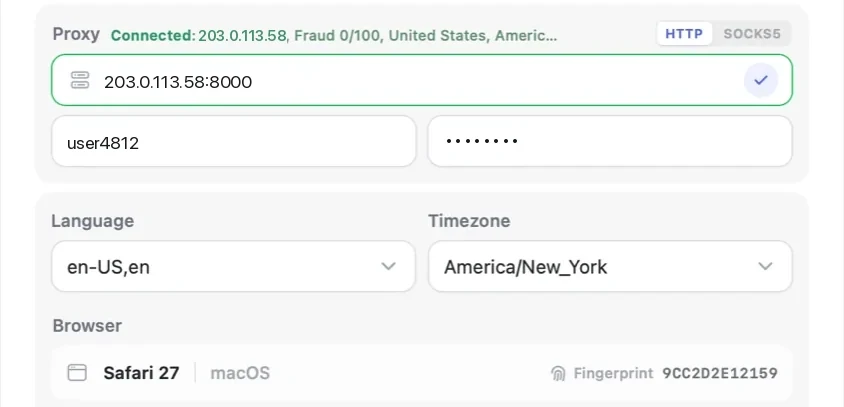
- Paste a proxy (HTTP or SOCKS5) from the country where the account usually works, then click the check mark. Accovod shows the IP, the country and the Fraud Score.
- Click Add. The profile gets its own fingerprint, and its language and time zone match the proxy.
- Open tiktok.com in the profile and log in once. The next time you open the profile, you’re still logged in.
- Repeat for every account. If a client sends you cookies instead of a password, you can log in with them, as the cookies guide explains.
If a teammate posts for the same clients, put the profiles in a cloud group and share it by email, as shown in the teamwork guide. They open TikTok already logged in and never see the password.
Accovod costs from $15 a month with unlimited profiles.
TikTok web not working: common fixes
Most problems with TikTok in a browser come down to cookies, extensions or the IP address.
- The page doesn’t load or stays blank. Update the browser, turn off ad blockers and privacy extensions for tiktok.com, then reload the page.
- TikTok web login is not working or the QR code expires. Refresh the page to get a new code, update the TikTok app on your phone and try another way to log in.
- TikTok says “Maximum number of attempts reached. Try again later.” This comes after several failed logins or codes in a row. Stop for a while instead of trying again and again, then log in once, ideally with the QR code.
- TikTok keeps logging you out. Check that the browser doesn’t clear cookies when it closes. A cleaner extension or a “clear on exit” setting will end the session every time.
- You get codes or checks on every login. This often happens when the IP keeps changing countries. Keep each account on one proxy from one country.
- TikTok doesn’t open at all. TikTok is blocked in some countries, and the site won’t load from an IP there.
If one account loads and another doesn’t on the same computer, the problem is usually that account’s session or IP, not the browser.
FAQ
Can I use TikTok on a computer without the app?
Yes. Go to tiktok.com in any modern browser. You can watch, comment, message, upload finished videos and see your stats without installing anything. Recording with the camera and effects stay in the app, and to go LIVE you need the app or TikTok LIVE Studio.
How do I log in to TikTok web?
Click Log in on tiktok.com and choose a QR code, a phone number, an email or username, or Facebook, Google or Apple. The QR code is the fastest if the account is already on your phone: scan it in the TikTok app and confirm.
Can I upload videos on TikTok web?
Yes. Click Upload or open TikTok Studio, drag the video in, then add a caption, a cover and hashtags. You can post right away or schedule the post. The editor is basic, so edit the video beforehand.
Can I have two TikTok accounts open at once?
Not side by side in one browser. You can switch accounts from the profile menu or log out and back in, but only one account is active at a time. To keep two or more accounts open at once, use a separate profile for each one with its own cookies and proxy.
Can you go LIVE on TikTok from a computer?
You can watch LIVE on tiktok.com. To go LIVE from a computer, you need TikTok LIVE Studio, and your account needs LIVE access first.
Why does TikTok web keep logging me out?
Usually because the browser or an extension deletes cookies when it closes, or because the IP changes between sessions. Allow cookies for tiktok.com and keep each account on the same proxy.
Cheat sheet
- If you have two accounts, your own and a brand, put each one in its own profile and log in once.
- If you have ten client accounts, give each profile a proxy from the client’s country and don’t change it.
- If a client sends cookies instead of a password, log in with cookies and don’t ask for the password at all.
- If a team posts for the same clients, share the profiles in a cloud group instead of passing passwords around.