Workspace
Settings
Every Accovod setting on macOS and Windows — profile loading mode, fingerprint protection mode, default browser and search engine, blocking, sound and language.
Open Settings with the gear at the bottom of the profile list. Settings apply to every profile.
Fingerprint Protect — protection mode
Section titled “Fingerprint Protect — protection mode”The same on macOS and Windows.
| Mode | What it does | When to use it |
|---|---|---|
| V3 More Native | Changes less and behaves closer to a plain browser. Maximum compatibility. | The default. Suits most sites. |
| V3 More Privacy | Spoofs more values and closes a few more ways to learn real data. | A site still sees real values or links your profiles. |
See How the fingerprint works.
Everything else
Section titled “Everything else”After Save, profiles are rebuilt with the new values; cookies are kept.
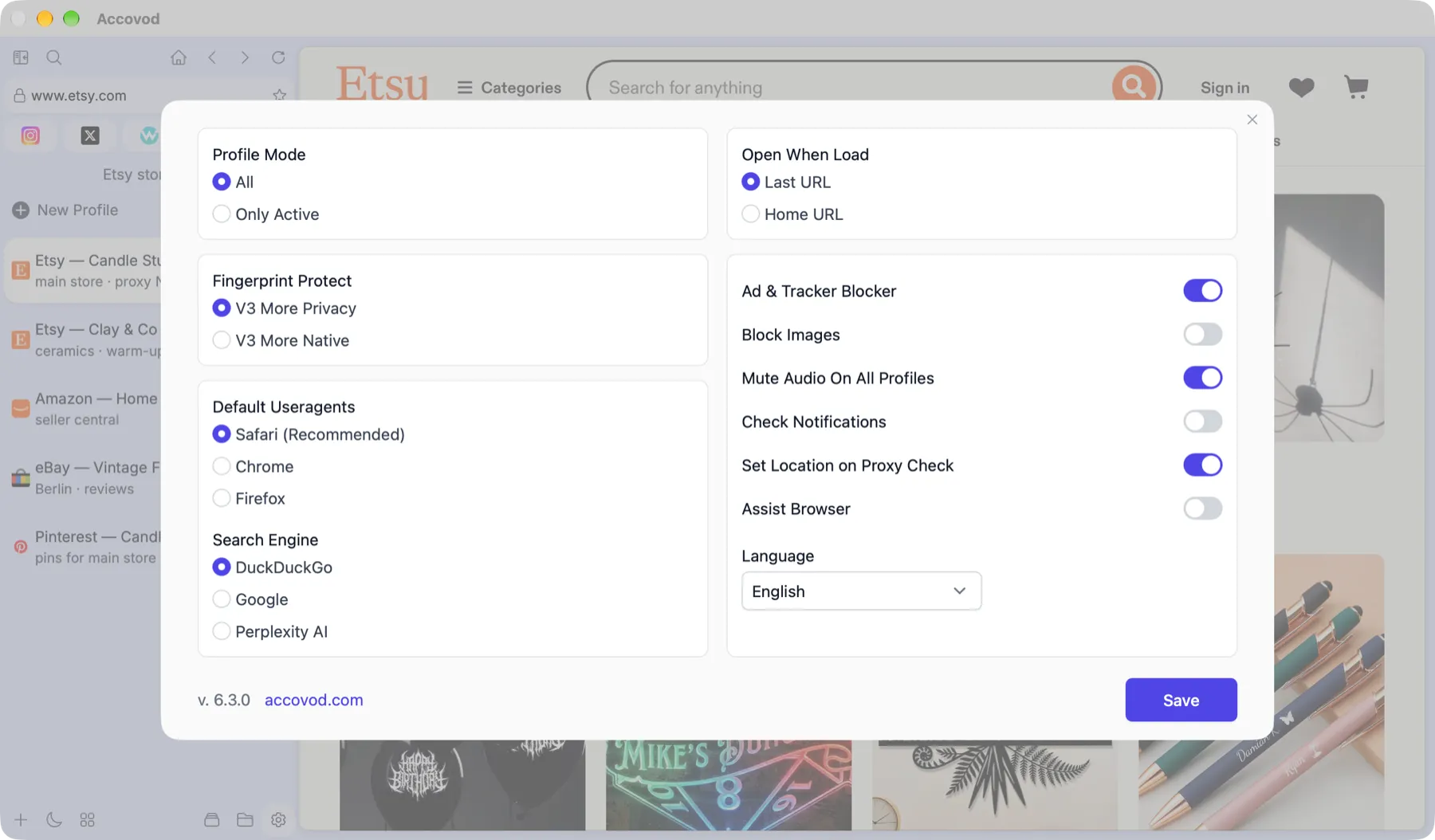
The settings window on macOS.
Profile Mode — how many profiles stay loaded
Section titled “Profile Mode — how many profiles stay loaded”| Mode | How it works | When to use it |
|---|---|---|
| All | Every profile of the group is loaded at once. Switching is instant, and with Check Notifications on, notifications arrive in all of them. | A modest number of profiles and enough memory. |
| Only Active | Only the open profile is loaded. On switch, Accovod saves the previous profile’s cookies and loads the next — it takes a couple of seconds. | Many profiles and the Mac starts to slow down. |
For new profiles
Section titled “For new profiles”- Default Useragents — which browser new profiles present themselves as: Safari (recommended), Chrome or Firefox. Safari is the most honest choice: Accovod on macOS runs on WebKit, so the behavior a site sees matches the User-Agent.
- Default Search Engine — where to search when the address bar gets words instead of an address: DuckDuckGo, Google or Perplexity AI.
- Open When Load — what a profile opens on start: Last URL (where you left off) or Home URL (the profile’s start site).
Resources and sound
Section titled “Resources and sound”- Ad & Tracker Blocker — block ads and trackers.
- Block Images — don’t load images. Pages open faster and use less proxy traffic.
- Mute Audio On All Profiles — mute every profile.
- Check Notifications — show unread-notification counters on profile cards. While it’s on, hidden profiles keep working in the background and get new messages right away. If you don’t need the counters, turn it off — background profiles then rest until you switch to them.
- Set Location on Proxy Check — after a proxy check, set the profile’s timezone to that IP’s timezone. See Proxy check.
- Assist Browser — a floating mini browser window. See Assist Browser.
- Language — interface language: English, Русский, 中文, Português, Español, Tiếng Việt.
The macOS menu bar has a separate Automation menu for turning on the API and MCP for AI agents. See AI agents & API.
Accounts Work Mode — how profiles load
Section titled “Accounts Work Mode — how profiles load”| Mode | How it works | When to use it |
|---|---|---|
| All at Once | After a group opens, every profile gradually loads in the background. Switching is instant afterwards. | A modest number of profiles and enough memory. |
| Load When Selected | A profile loads the first time you click it and then stays open. | The middle ground: groups open quickly. |
| Only Active | Only the open profile stays in memory; the rest are unloaded. Cookies are saved before unloading. | Many profiles and the computer starts to slow down. |
For new profiles
Section titled “For new profiles”-
Default Useragents — which browser new profiles present themselves as:
Option Meaning Auto The Accovod fingerprint service picks the User-Agent. The default. Chrome:Latest, Edge:Latest, Firefox:Latest The latest version of that browser. Mobile A mobile browser. Native No override: sites see the engine’s real User-Agent. -
Search Engine — where to search when the address bar gets words instead of an address: DuckDuckGo, Google or Perplexity AI.
-
Open When Load — what a profile opens on start: Last URL or Home URL.
Notifications and language
Section titled “Notifications and language”- Check Notifications — counters on profile cards: Disabled, All (every notification) or Messages (messages only).
- Language — English, Русский, 中文, Português, Español, Tiếng Việt.
Toggles
Section titled “Toggles”| Setting | What it does |
|---|---|
| Ad & Tracker Blocker | Blocks ads and trackers. |
| Block Images / Block Video | Don’t load images / video — faster and lighter on proxy traffic. |
| Mute Audio On All Profiles | Mute every profile. |
| Set Location on Proxy Check | After a proxy check, set the profile’s timezone to that IP’s timezone. |
| Save and Autofill Passwords | The browser remembers entered passwords and fills them in. |
| Assist Browser | A floating mini browser window. See Assist Browser. |
| Classic Address Bar | Show a separate address bar above the page. |
| Disable Autofocus | A page can’t grab keyboard focus while you work elsewhere. |
| Block Pop-up Windows | Links that open a new window or tab open in the profile’s current tab instead. |
| GPU Enabled | Hardware graphics acceleration. Takes effect after restarting Accovod. |
| Auto Clear Cache | Clear the profiles’ cache when a group or the program closes. Cookies and logins are kept. |
The API & MCP for AI agents button opens the window for connecting AI agents. See Connect an agent.